
Sherlock: from Hackathon to company-wide AI assistant
We built Sherlock: an AI chat that answers questions about our codebase in plain English. This post covers how we went from a 3-day Hackathon prototype to a company-wide assistant.
At Remote, we write documentation in Notion and invest real effort in keeping things accurate. But features evolve bit by bit over time. Small changes accumulate. A doc written three months ago might describe 90% of the current behavior, but the missing 10% is often the part someone needs right now. The codebase is always up to date by definition.
- Product teams need to understand feature behavior for planning.
- Support agents need to answer customer questions about edge cases.
- Sales teams need accurate product details for demos.
All of them depend on engineers to confirm what the code does today.
This creates three problems:
- Engineers have to spend time answering “how does X work?” questions, which impacts productivity.
- Non-engineers are blocked until they get an answer about product behavior.
- Feature planning slows down because understanding the current system requires an engineer in the room.
Your codebase holds every answer about how the product works. Only engineers read code.
We wanted to change this.
The Hackaton
Four of us entered Remote’s internal hackathon with one goal: build a chat tool where anyone at the company asks questions about our codebase and gets accurate AI-powered answers.
The team: two full-stack engineers, one SRE, one designer. Three days.
We named the project Sherlock.
Day one split into parallel tracks. The engineers set up a Phoenix 1.8 application and integrated OpenCode, an AI code analysis engine. OpenCode reads Git repositories, understands code structure, and answers natural language questions. We built a GenServer-based session manager to communicate with the OpenCode API over HTTP and Server-Sent Events.
The designer shaped the chat interface. The SRE started building the Kubernetes deployment.
Ash Framework saved us serious time on authentication. Every Remote employee uses Okta for SSO. We needed the same for Sherlock. With AshAuthentication, the entire Okta OIDC integration became a resource declaration:
defmodule Sherlock.Accounts.User do
  use Ash.Resource,
    extensions: [AshAuthentication]

  authentication do
    strategies do
      oidc :okta do
        client_id Sherlock.Secrets
        client_secret Sherlock.Secrets
        base_url Sherlock.Secrets
        redirect_uri Sherlock.Secrets
        authorization_params scope: "openid email profile"
        registration_enabled? true
      end
    end
  end
end
No OAuth plumbing, token refresh logic, or session management code required. Ash handled all of this declaratively. First login auto-registers the user. Token storage and rotation happen through the framework. The full authentication system took under an hour.
By day two, we had a working chat interface with real-time streaming responses. The designer refined the UI. Engineers wired up session persistence and chat history.
Day three: polish, testing, deployment. The SRE finalized Kubernetes manifests, configured secrets through AWS SSM, and set up the CI/CD pipeline in GitLab.
By demo day, Sherlock was live. Any Remote employee logs in with Okta and asks questions about the codebase in plain English. Here are two real conversations from the first week:
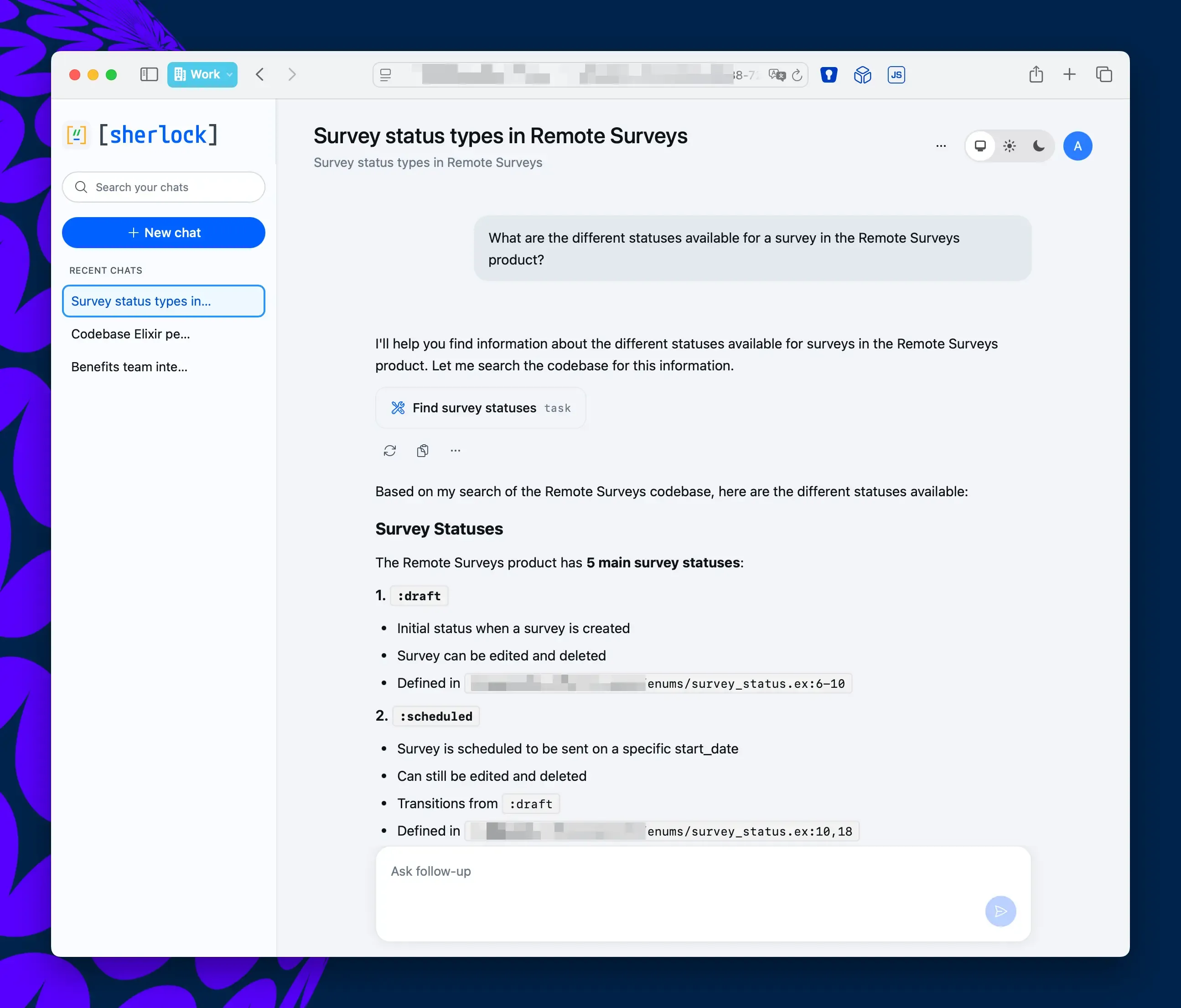
A support agent asks what survey statuses exist in the product. Sherlock traces the enum definitions, lists every valid state with transition rules, and links directly to the source files.
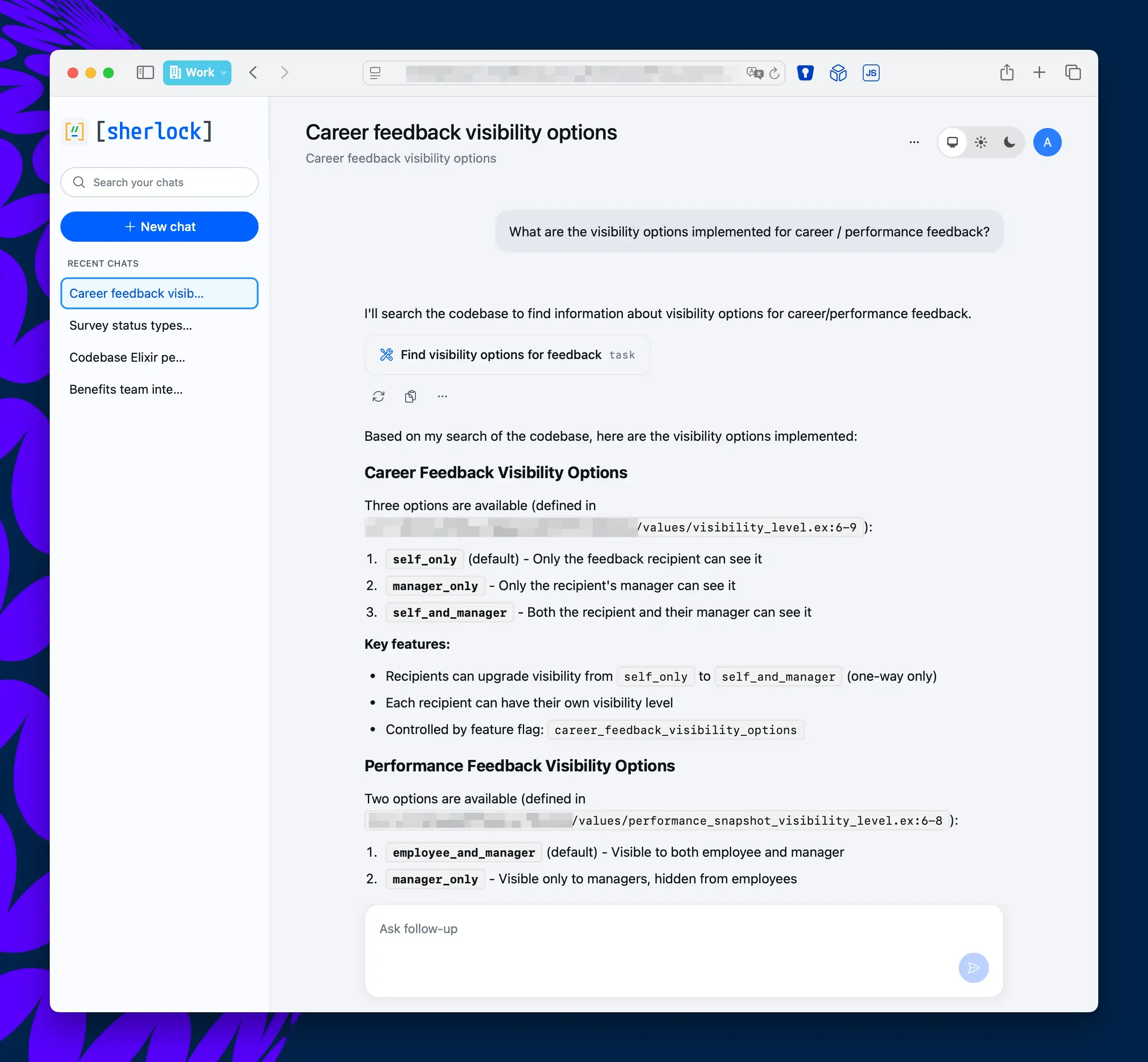
An HR team member asks how career feedback visibility works. Sherlock surfaces all three visibility levels, explains which feature flag controls them, and points to exactly where each rule is defined in the codebase.
No tickets filed. No engineers interrupted.
How Sherlock Works
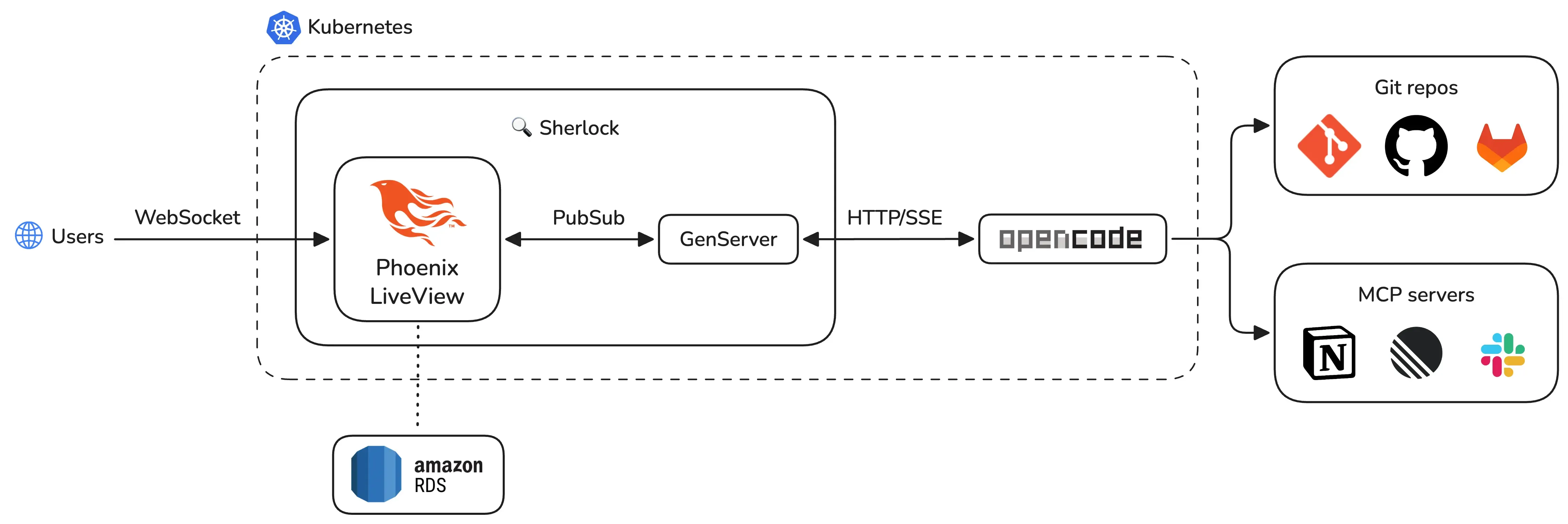
Sherlock has three layers: an AI engine (OpenCode), a real-time web application (Phoenix LiveView), and cloud infrastructure (Kubernetes on AWS EKS).
OpenCode: the AI engine
OpenCode runs as a separate deployment in the same Kubernetes namespace: it has direct access to our Git repositories through git-sync sidecar containers. These sidecars pull the latest code from GitLab every 60 seconds. OpenCode always reads current code, not stale snapshots.
When a user asks a question, Sherlock forwards the request to the OpenCode API. OpenCode then reads the relevant source files, processes the question, and streams a response back through Server-Sent Events (SSE).
OpenCode also connects to external tools through MCP (Model Context Protocol) servers. This gives the AI access to Notion docs and Linear issues alongside the code. A PM asking “how does employee onboarding work in Brazil?” gets an answer sourced from both code and product specs.
Here’s a typical request flow:
- User types a question in the chat UI.
- Sherlock’s GenServer sends a
POSTto/session/:id/message. - OpenCode processes the question against the codebase.
- Chunks stream back via SSE on
GET /event. - Each chunk gets broadcast to the LiveView through PubSub.
The permission model is strict. OpenCode has read-only access to the codebase: file writes, git pushes, dependency installs, and network requests are all denied by configuration. The AI reads code, nothing else.
Phoenix LiveView: real-time streaming
Each chat session runs as an independent GenServer process managed by a DynamicSupervisor. The GenServer owns the SSE connection to OpenCode, parses incoming events, and broadcasts updates through Phoenix PubSub.
When a user opens a chat, the LiveView subscribes to the session’s PubSub topic. As text chunks arrive from OpenCode, the GenServer parses them and broadcasts to all subscribers. The LiveView appends each chunk to the response in real time. Users see the AI writing word by word.
Here is the SSE streaming handler, showing how Req and GenServer work together:
defp run_sse_stream(parent, base_url, session_id, req_options) do
  url = "#{base_url}/event"

  opts =
    Keyword.merge(
      [
        headers: [{"accept", "text/event-stream"}],
        into: fn {:data, chunk}, acc ->
          handle_sse_chunk(parent, session_id, chunk, acc)
        end,
        receive_timeout: :infinity
      ],
      req_options
    )

  Req.get(url, opts)
end
Each chunk arrives through the Req streaming callback. The GenServer parses the SSE event and broadcasts a PubSub message. The LiveView picks up the broadcast and updates the DOM.
This architecture gives us natural process isolation. Each session holds independent state. A crash in one session never touches another. The DynamicSupervisor restarts failed sessions automatically. OTP supervision and fault tolerance come for free.
We chose LiveView over a separate frontend framework. LiveView renders on the server and pushes DOM diffs over WebSocket. The entire real-time streaming chat required zero custom JavaScript. One language, one codebase, one deployment.
Kubernetes setup
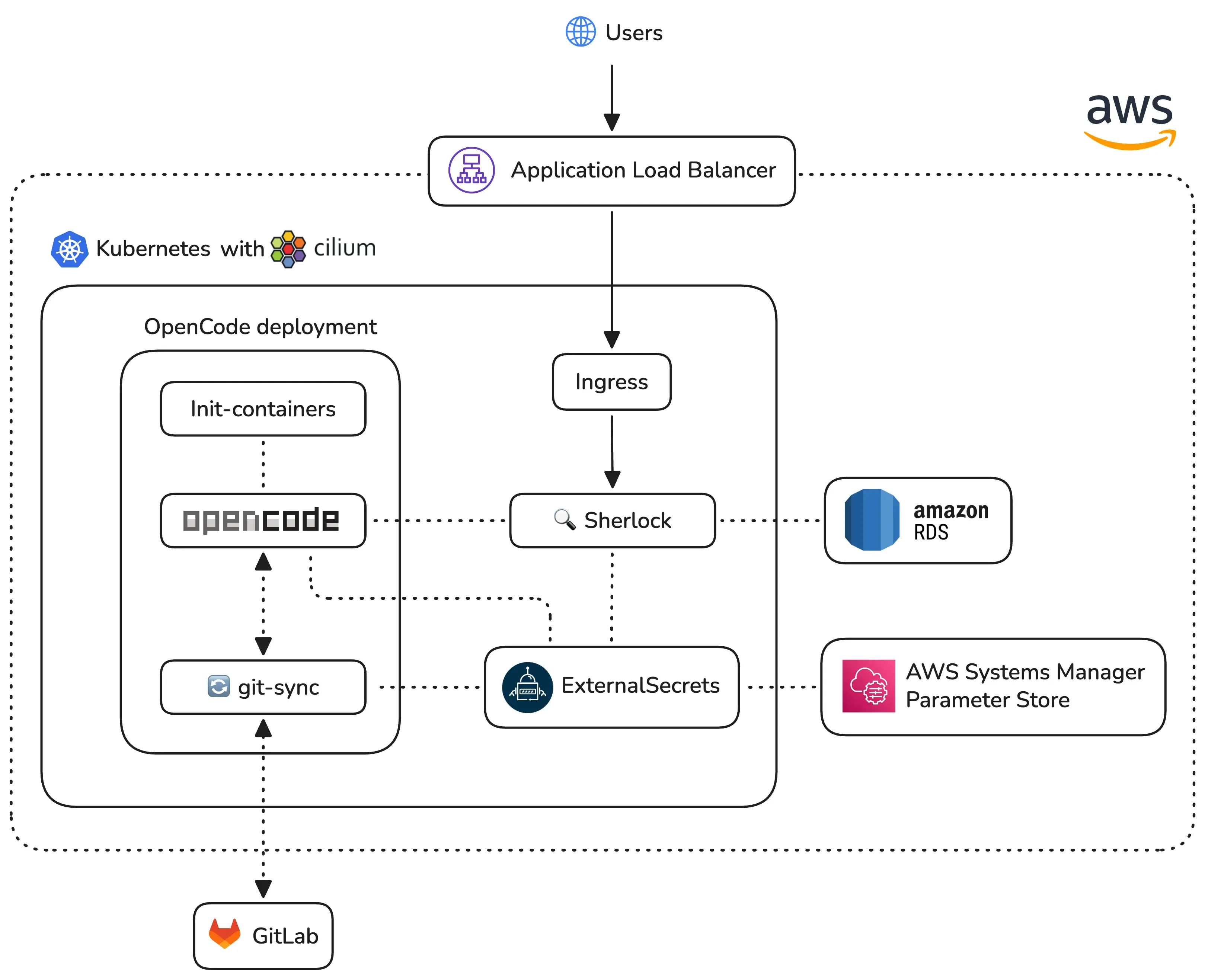
Our Sherlock application runs within a dedicated Kubernetes namespace alongside OpenCode, which we configured with a strict security model to ensure safe repository analysis. The OpenCode setup uses a JSON-based permission schema that defaults to a deny-all policy, specifically restricting the agent from accessing sensitive files like environment variables, secrets, or SSH keys. While the system allows for broad read-only access and code searching, we have explicitly disabled editing and administrative bash commands to maintain environment integrity.
The deployment utilizes several init-containers to prepare the workspace by setting up data directories, fetching Git credentials, and ensuring our PostgreSQL database is ready before the main application starts. Although the application logic lives in Kubernetes, we rely on Amazon RDS for a managed and highly available database. We also employ sidecar containers running git-sync to keep local source code repositories constantly updated from GitLab.
Our CI/CD pipeline ensures code quality and rapid delivery through a fully automated workflow. Every code push triggers a job to compile the application, run linters, and execute our test suite. Once a pull request merges into the main branch, the pipeline automatically builds a new Docker image and pushes it to Amazon ECR. The final step in the process updates our Kubernetes cluster to deploy the latest version of the service.
What’s next
Sherlock started as a three-day hackathon prototype. The demo proved the concept works. A PM asked “how does payroll work in Brazil?” and got a code-backed answer in seconds. No engineer needed.
We’re now turning the prototype into a production-grade tool built for hundreds of concurrent users.
The biggest takeaway from building Sherlock: the people who need codebase knowledge most are the people least equipped to read code. Give them a conversational interface, and the entire organization gets faster.